The advanced
3D AI Workflow
How I direct an AI video with a phone in my hand — block the scene in Blender with the Higgsfield Blender plugin, shoot the camera with VirtuCam, and let Seedance 2.5 render the film. The complete recipe behind the horse reel.
Inside the process 10 chapters
AI video models can’t hold a camera. So I hand them one.
Text prompts describe a shot. They don’t control it. A Blender blockout gives the model something it does obey: a real camera path, real timing, real staging — recorded with my phone, not typed.
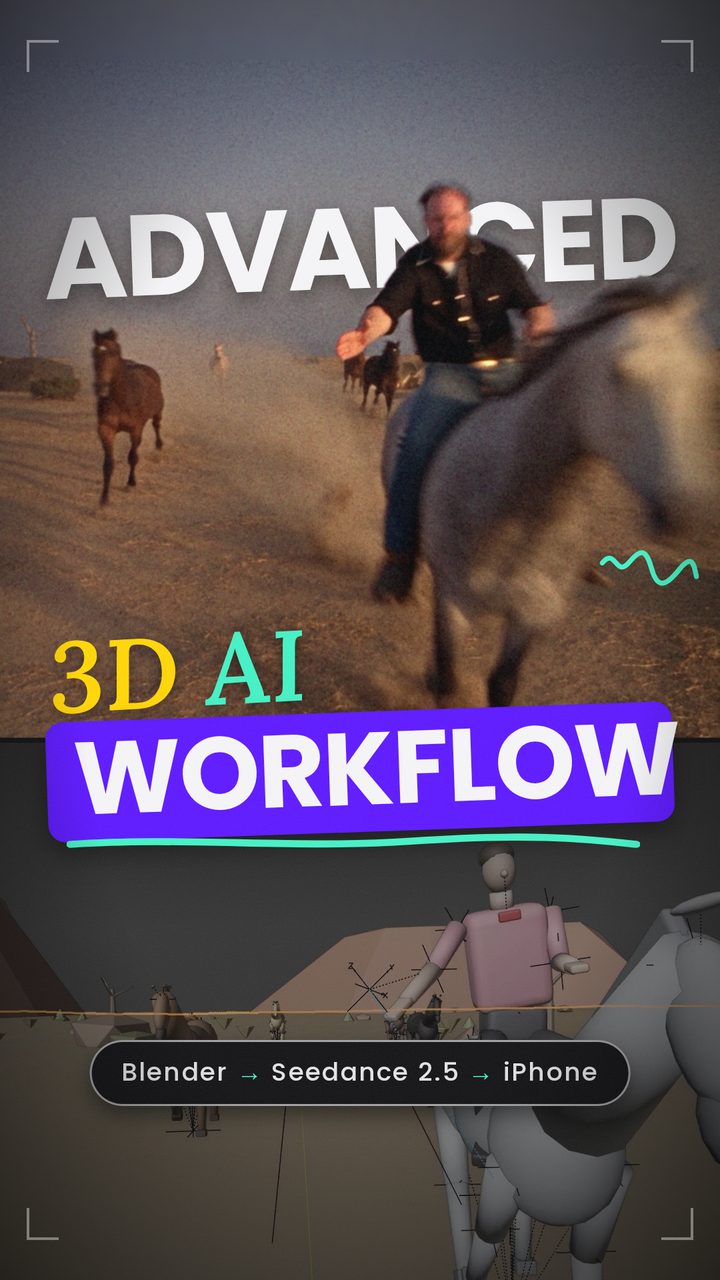
The whole trick is a three-layer sandwich. Bottom layer: my phone, moving in my hand. Middle layer: Blender, where that phone motion drives one camera in a scene made of grey blocks — horses, a rider, a tripod, a hill. Top layer: Seedance 2.5, which takes the Blender playblast as its camera reference and paints the film on top.
Everything below is the exact process for the horse reel: a 15-second single shot where I gallop toward a camera on a tripod, grab it, and keep filming myself while the herd overtakes me. No cut. One take.
What you need
- Blender
- blender.org — 4.2 or newer (I’m on 5.2). Free.
- VirtuCam
- virtucamera.com — iPhone app + the Blender add-on. Turns your phone into the camera.
- Higgsfield Blender plugin
- Get the plugin — the bar inside Blender for scenes, 3D models, stills and Seedance video, and the Bridge that lets Claude drive your scene.
- Higgsfield MCP for Claude
- Same link — connects Claude to Higgsfield so it can write the prompts, generate the character sheet and the stills, and talk to Blender.
- Claude
- Wrote the rig, the drivers and every prompt in this guide. You can do it by hand — it just takes longer.
- Edit
- DaVinci Resolve or Premiere for the stack, the audio and the end card.
Install everything in five minutes
Higgsfield plugin → Blender
- Download the
.zipfrom the plugin page. One signed file, no installer. - Drag the
.ziponto any open Blender window — it installs and enables itself. Manual route: Edit → Preferences → Add-ons → Install. - The Higgsfield bar floats over the viewport. Sign in with your Higgsfield account. Works on Blender 4.2+ on macOS and Windows.
Connect Claude to Higgsfield and to Blender
I work in Claude Cowork — the Claude desktop app, where Claude can use tools and see a folder on my Mac. Two “connectors” do all the work: one talks to Higgsfield (for generating), one talks to Blender (for building the scene). You add both once and they stay.
- Make a project folder on your computer, e.g.
Horse reel. This is where Claude will save previews, contact sheets, renders and prompts, and where you drop your reference stills. Open the Claude desktop app, start a Cowork session and connect that folder when it asks which folder to work in. - Add the Higgsfield connector. In the Claude app: Settings → Connectors → Add custom connector. Name:
Higgsfield. URL:https://mcp.higgsfield.ai/mcp. Click Add, then sign in with your Higgsfield account when the login window appears. From now on Claude can generate stills and video on your account. - Add the Higgsfield Bridge connector the same way. Name:
Higgsfield Bridge. URL:https://bridge.higgsfield.ai/mcp. Sign in again. This one is the cable into Blender. - Open Blender with the Higgsfield plugin signed in (same account). That’s it — the Bridge finds the running Blender by itself. Anything Claude builds appears in the file you have open as real, editable objects, keyframes and drivers.
- Test it in the Cowork chat: “Add a 1.6 m tall grey horse made of ellipsoids at the origin and show me a screenshot.” If a horse appears in your viewport, everything is wired.
VirtuCam
- Install the iPhone app, then the Blender add-on from the same site (Edit → Preferences → Add-ons → Install). Phone and Mac on the same Wi-Fi; the add-on shows a code the app connects to.
Block out the scene in grey — by briefing Claude
I don’t model and I don’t keyframe by hand. I describe the shot to Claude in plain words and let it build the blockout through the Bridge. What matters is scale, timing and staging — the model reads those from the video. Nothing else survives the render anyway.
The brief that produced this scene
Then it’s a conversation, not a script. Every round I asked for a contact sheet from the camera and answered with one sentence: “the mount looks wrong — he should face the horse, not the camera”, “the herd should stay visible among the trees till the last frame”, “the deer backs away two steps before it runs”. Claude edits the keys, renders the sheet again, I look. Ten rounds is normal. Things to insist on:
- Real units. Horse 1.6 m at the withers, rider 1.8 m, tripod at the height of his hand when he grabs. The lens is 20 mm — a wide lens exaggerates any scale mistake.
- Real speed. A gallop is ~45 km/h ≈ 0.47 m per frame at 24 fps. My hero horse travels from (6, 62) to (0.9, 0) in 134 frames. The herd starts 22–38 m behind and runs 0.11–0.14 m/frame faster, so each horse overtakes at a different moment.
- Gait, not keyframes. Legs, neck and body bob run on drivers:
rotation = radians(38)·sin(frame·0.6283 + phase)·gait. One custom propertygaitper horse turns the whole cycle on or off. - Markers on the timeline for every beat: 1 tripod · 112 reach · 134 GRAB · 150 selfie hold · 170 first horse passes · 317 last horse · 360 end. They become the timecodes in the prompt later.
- Length: 15 s = 360 frames @ 24 fps, 1920 × 1080. That is Seedance 2.5’s sweet spot for one continuous take.
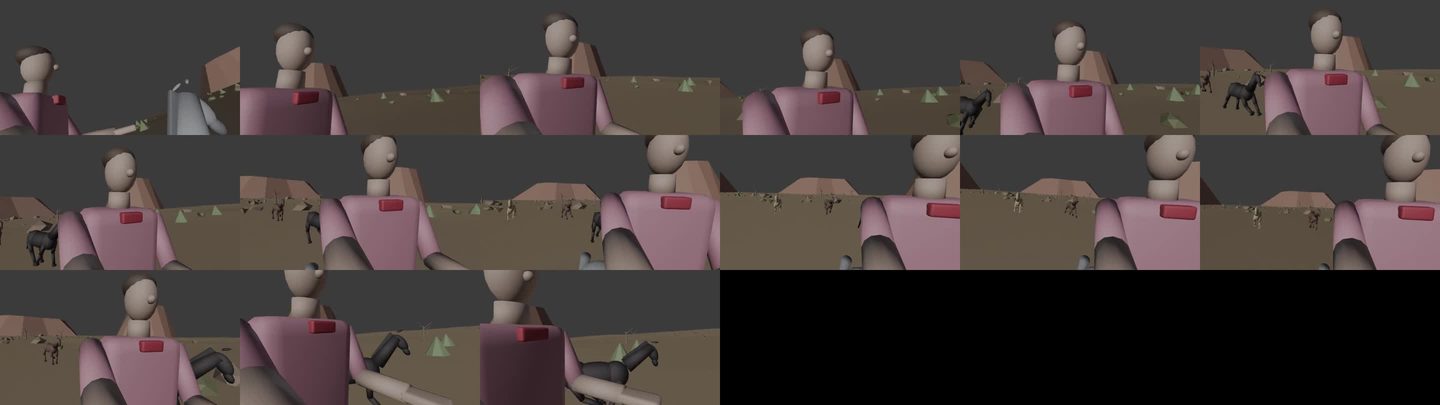
Rig one camera that changes hands
The shot starts on a tripod and ends in the rider’s hand. The obvious way — two cameras and a marker switch — reads as a cut, because it is one. What I want is one camera whose parent switches: it stands on the tripod, then at the grab frame it starts travelling with the hand, and my phone keeps steering it the whole time in one VirtuCam take. You don’t build this yourself. You ask Claude for it — the trick is knowing what to ask.
What I told Claude
1. “One camera, not two. It starts on a tripod at 1.9 m and at the grab (frame 134) it should become part of the rider’s right hand, held at arm’s length pointed back at his face — with no jump in the image. The switch can blend over three frames.”
2. “I’ll record the camera with VirtuCam, so the camera itself must stay free: I need to be able to move it with my phone before and after the grab, and the phone motion should sit on top of the hand motion.”
3. (after the first test) “When I connect VirtuCam the view flips upside down. Fix the rig so a level phone gives me the opening framing before the grab and a selfie on the face after it.”
Message 3 is the important one. It sent Claude to the actual constraint: VirtuCam writes the camera’s transform relative to its parent, so if the parent carries any rotation, the phone’s rotation gets multiplied with it and the picture flips on connect. The fix Claude built — and the reason the rig looks the way it does — is that the camera’s parent only ever copies position, never rotation.
What Claude built (so you can check it)
CAM_tripod— an empty at the tripod position, placed exactly where the hand will be on the grab frame, so the hand-off doesn’t jolt.CAM_grip— an empty parented to the right elbow, ~20 cm above the fingertips, aimed at the face (not along the arm, or the hand covers the lens).CAM_base— an empty with two Child Of constraints, TRIPOD and HAND, location channels only. Influence keyed 1→0 / 0→1 across frames 134–137.CAM_main— the actual camera, child ofCAM_base. Its own rotation is the opening framing: level camera pointed at the rider. VirtuCam records onto this object.CAM_lookdelta— an empty on the elbow carrying the rotation “level phone → looking at the face”.CAM_maincopies it (Copy Rotation, mix Before) with influence 0→1 on the grab. After the grab a phone held flat means a selfie framed on the face; every move you add on the phone stacks on top.
You don’t need to remember the names. Ask for the behaviour, check the two symptoms — does a level phone give the opening frame? does the picture stay continuous through the grab? — and have Claude verify the aim numerically (it reported 0° error before and after the grab for mine).
Shoot the camera with your phone
- Open the scene, select
CAM_main, connect VirtuCam. Hold the phone level: level phone = your opening frame. If it isn’t, the parent has rotation — go back to step 02. - Play the timeline and record the whole 15 seconds in one take. Before the grab, stand still and give it only a tiny human pan following the rider. From the grab on, move like a person on a galloping horse: bounce, over-correct, snatch and settle. The horse already adds its own bob through the arm.
- Turn helper constraints (Track To, etc.) off before recording — they fight the phone.
- Export the take: in the Higgsfield bar hit Render Playblast. Before you do, check Output Properties: 1920 × 1080 at 100 %, H.264 — a 40 % preview export is an easy mistake and Seedance will happily copy a blurry reference.
This MP4 is the most important file in the workflow. Seedance will copy it beat for beat.
Two stills carry the whole look
Early versions used four references and long paragraphs about film stock. The final take used two images and one sentence: “the whole image takes its mood from Image 2.” Less is more — every extra reference is another thing the model can misread.
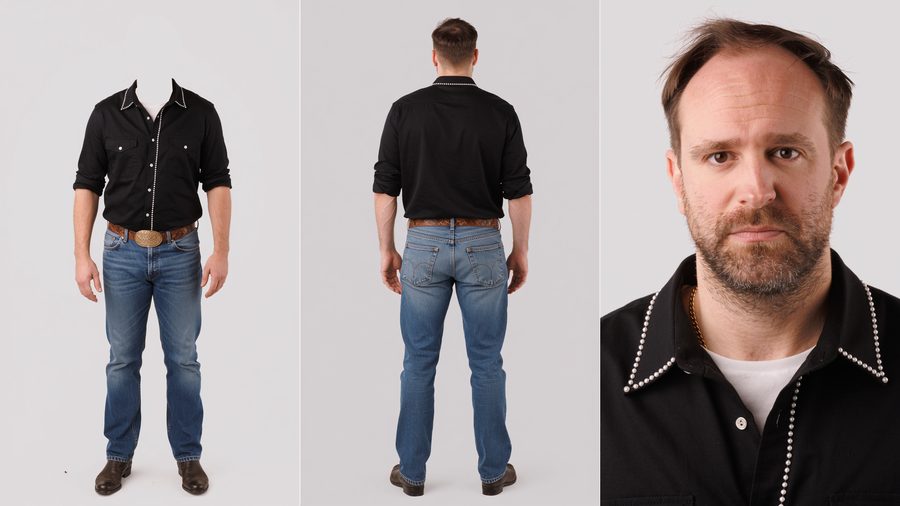
Generate the sheet in Soul Cinema with one photo of yourself attached as the reference: front view without the head (so the outfit locks without the face fighting it), back view, and a chest-up face plate. Say what you don’t want out loud — no hat, no sunglasses — or you will get both.
The character sheet — Soul Cinema prompt
Three things make this prompt work: the headless front panel is described as an empty collar (not a cut), the light is declared flat and shadowless so no lighting gets baked into the reference, and the grey is named as one value across all three panels so the sheet reads as a single object.
- Model
- Higgsfield Soul Cinema + one reference photo of the person
- Camera preset
- 35mm Film
- Lens preset
- Warm Vintage
- Quality / size
- 2k · 2048 × 1152 (16:9)
A three-panel character reference sheet composed as one horizontal frame, divided into three equal vertical panels side by side, thin clean separation between panels, the same man and the same outfit rendered identically across all three. The man is the character from the attached reference — same face, same skin, same hair, same build in every panel.
He is styled as a modern cowboy with a 1980s register. Short dark hair with a slightly grown-out, wind-tousled top and neat sides, light stubble along the jaw, no hat. He wears a black cotton western shirt with tone-on-tone black piped front and back yokes, pearl snap buttons in white mother-of-pearl down the front and on the chest pocket flaps, the collar open at the throat showing a plain thin white t-shirt underneath, sleeves rolled twice to just below the elbow. A thin gold chain sits at the collarbone. High-waisted medium-wash blue Levi's 501 jeans, slim straight fit, a wide dark-brown tooled leather belt with a heavy oval brass buckle, the jeans stacking slightly over dark-brown leather western boots with a low stacked heel and squared toe. Nails short and clean. No sunglasses, no hat, no other accessories.
LEFT PANEL — full body front view, no head, no neck, and no hair. The body stands squared to camera from the shoulders down to the boots, arms relaxed at the sides, hands open and loose, weight even across both feet. There is no head, no neck, and no hair at all — nothing rises above the shoulder line, and no hair falls across the chest or shoulders. The open collar of the black western shirt holds its own shape at the top of the garment and its opening is an empty dark hollow looking down into the inside of the shirt, the white t-shirt neckline faintly visible as a light ring just inside the opening; the gold chain rests on the fabric around the empty collar. The garment reads as if worn by an invisible body — full three-dimensional shape, natural drape, real fabric tension across the chest and shoulders, but nothing emerging from the neckline. No stump, no skin, no cut edge, no anatomy, no blood, no fade, no blur, no ghosting, no transparency in the body. The panel keeps full headroom, generous empty mid-gray backdrop above the shoulders, so the figure sits at the same scale and position in the frame as a normal full-body portrait.
CENTER PANEL — full body rear view, head attached. The same man photographed from directly behind, standing straight, arms relaxed at the sides, hands loose, weight even across both feet, from the top of the head down to the boot heels. The short dark hair from behind with its neat tapered sides, the piped back yoke of the black shirt, the belt and buckle from behind, the back pockets and rear seams of the 501s, and the boot heels all readable from behind.
RIGHT PANEL — tight chest-up portrait, identity lock. The same man framed from just above the top of the head down to the collarbones and the very top of the shirt only, the face filling most of the panel, a true close-up. Body squared to camera, head level, eyes directly to camera, lips closed and relaxed, neutral controlled expression. Hairline, brows, lashes, stubble, lip texture, skin detail, the open black collar with the white t-shirt and gold chain all clearly readable at close range.
18% neutral gray seamless studio backdrop applied uniformly across all three panels — one single flat uniform value corner to corner in every panel, no seam line, no gradient, no hotspot, no vignette, no falloff to black or white, and the identical gray value in all three panels. Relight from scratch overriding any reference lighting: completely flat shadowless illumination in every panel — one enormous soft frontal source at camera position with matched equal fill from camera-left, camera-right, above, and below, so both sides of the face and body read at exactly the same brightness. No key-and-fill ratio, no modelling, no shadow side, no nose shadow, no under-chin shadow, no rim light, no hair light, no kicker, no specular hotspot. Zero shadow cast onto the background in any panel — the backdrop stays clean flat gray behind and around the figure. No contact shadow, no drop shadow, no ambient occlusion on the floor beneath the boots. Extremely low contrast, even, milky, catalogue-flat, identical in every panel. Form is described by fabric folds, garment structure, and bone structure alone, not by light and shadow. Skin and fabric read matte and velvety, no shine, no gloss, no oily T-zone. Skin renders at its true natural skin tone, identical in value and hue across the face, arms, and hands in every panel, never darkened, never tanned, never pale or washed-out by the background. The black shirt holds open shadow detail with its seams, yokes, and folds readable, never crushing to a flat black shape, the white snaps and the white t-shirt neckline reading clean against it; the medium-wash denim and the dark-brown leather render true and consistent across all three panels. Real peach fuzz at the jaw and hairline, real fine even pore texture, subsurface scattering reading as semi-translucent biology, real cotton and denim weave and drape, real tooled leather grain, fine metal surface detail on the buckle, snaps, and chain, never plastic, never waxy, never harsh. Captured on Super 16 mm color negative film with a 1980s color rendition — slightly softened resolution, fine organic 16 mm grain across the whole frame, gently faded warm-leaning colors, highlights rolled off softly. Photographed not generated.
The horses still — Soul Cinema prompt
This is the exact prompt behind Image 2. Notice the structure: composition and camera height first, then the animals one by one with their coats, then ground and horizon, then light, then the lens and the film stock, and a closing “real photograph” lock. The same order works for any location plate.
- Model
- Higgsfield Soul Cinema
- Camera preset
- 8mm Film
- Lens preset
- Warm Vintage
- Quality / size
- 2k · 2048 × 1152 (16:9)
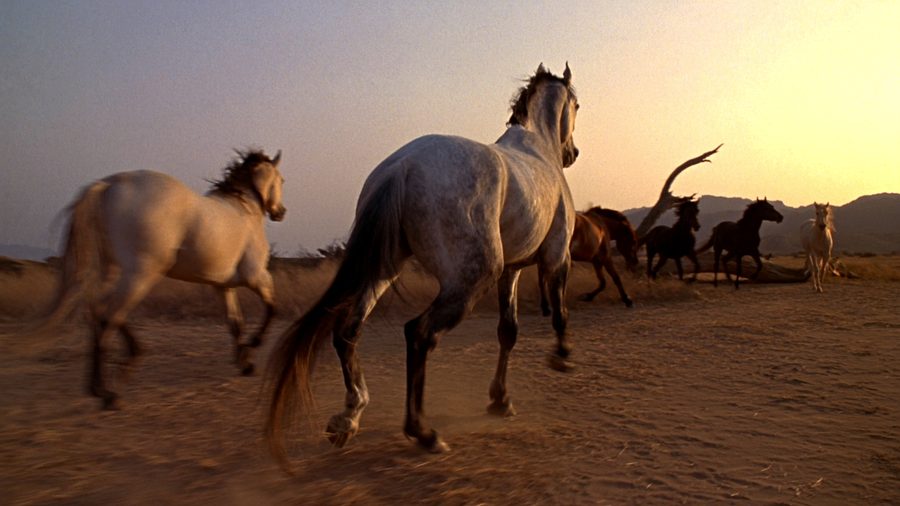
A cinematic still photograph captured on a real film camera standing in an open high-desert plain at the last twenty minutes of a summer evening — a wide, low composition from a camera held just above knee height, looking slightly up along the ground, a loose herd of six riderless horses galloping past close to the lens from the left background toward the right foreground on a shallow diagonal, the nearest horse only eight metres away and filling almost half the frame height, the farthest about twenty metres back, all six caught in different phases of the stride with backlit dust boiling up behind them, the horizon sitting in the upper third of the frame with the mesas softened behind them, the composition carrying the raw closeness and weight of animals passing at full speed.
The horses are bare of any tack — no saddle, no bridle, no halter, no rope. Leading the group in the right foreground is a dapple-gray horse with a pale silver coat mottled with darker rings across the hindquarters, a darker gray mane and tail streaming back, dark lower legs and dark muzzle, ears forward, nostrils flared, neck stretched, one foreleg reaching mid-stride. Half a length behind it a bright bay with a black mane, black tail and black lower legs; beside that a jet-black horse with a long thick black mane lifting off its neck; further back a red chestnut with a flaxen-tinged mane and tail; a dark bay almost brown-black with a faint tan muzzle; and on the far left of the group a golden palomino with a cream-white mane and tail catching the sun. Muscle definition, veins along the shoulders, sweat darkening the coats along the necks and flanks, hair texture and the sheen of the coats readable on the nearest three animals, hooves throwing clods of dirt, the dust they raise glowing gold and streaming off to the right.
The ground is hard-packed ochre and dusty rust-brown Texas dirt, cracked, scattered with pale dry grass clumps and low olive-gray creosote shrubs, a few small sandstone rocks in the foreground left. Behind the herd the plain runs open to the horizon with a dead bare mesquite tree standing in the mid-distance on the right and a scattered line of shrubs and yuccas; on the horizon a tall dark steep-sided mesa on the left and a wide low flat-topped mesa on the right, both softened by warm ground haze and rendered as layered silhouettes, the sky between them glowing.
The sun sits very low, just out of frame ahead and to the left behind the tall mesa, throwing hard warm backlight toward the camera — a hot amber rim along every horse's back, neck, ears and mane, the manes and tails lit through like glowing fiber, the faces and chests in soft warm shadow with detail held, the dust cloud behind the herd blazing gold-orange, long shadows stretching from the horses across the dirt toward camera-right, the sky grading from a pale yellow glow at the horizon through peach and dusty rose into a soft desaturated blue-gray at the top of the frame with thin high cirrus catching pink. Shadow areas hold a warm dusty terracotta value, never black.
Captured with a spherical wide lens around a 24 mm full-frame field of view at a moderate aperture, a fast shutter freezing the horses with only a faint softness on the flying hooves, manes and dust, the nearest horse and the herd sharp, the mesas softened by haze rather than focus, a light diffusion bloom lifting the sun glow and the dust into a soft halation, a faint warm veiling flare across the upper-left of the frame, gentle vignetting toward the corners. Shot on Super 16 mm color negative film with a 1980s color rendition — slightly softened resolution, pronounced fine organic 16 mm grain across the entire frame including sky, dust, coats and dirt, gently faded warm-leaning colors with dusty magentas in the shadows, highlights rolled off softly never clipping to hard white, blacks lifted and open, in an M3 action register. Real photographic frame captured on a real film camera on a real location, real horses with real muscle, hair and sweat, real dirt, real dust and haze — no CGI, no rendered look, no digital cleanliness, no oversharpening, no HDR, no plastic surfaces, no artificial glow.
The Seedance 2.5 prompt
I generate in Cinema Studio 4.0 — that is Seedance 2.5 under the hood, with camera, palette and lighting presets on top. 1080p · 16:9 · 15 s · audio on. Reference order: Image 1 = character sheet, Image 2 = horses still, Video 1 = Blender playblast.
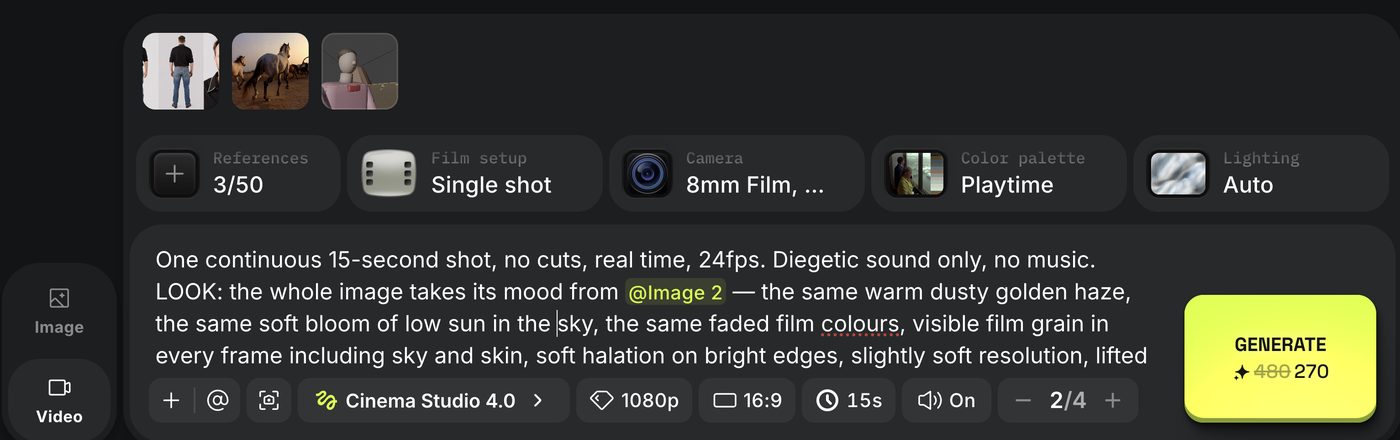
The camera settings are the same choice I made in Higgsfield Soul for the horse still: a small-gauge film camera preset and a warm, slightly faded palette. That matters — the preset, the reference still and the LOOK block in the prompt all say the same thing, so nothing fights. (When a preset and the prompt disagree, the preset usually wins and the prompt just adds noise.)
This is the prompt that produced the final take, unchanged.
One continuous 15-second shot, no cuts, real time, 24fps. Diegetic sound only, no music.
LOOK: the whole image takes its mood from [Image 2] — the same warm dusty golden haze, the same soft bloom of low sun in the sky, the same faded film colours, visible film grain in every frame including sky and skin, soft halation on bright edges, slightly soft resolution, lifted milky blacks. This is a 1980s film frame, not clean digital video, not a 3D render.
NOTHING IN THE FOREGROUND — CRITICAL: the frame is the clean view through the lens. No camera, no lens barrel, no lens ring, no camera body, no tripod, no tripod legs, no equipment, no hand, no object of any kind sits in the foreground or at the bottom edge of the frame at any point. For the first 5.6 seconds the bottom of the frame is only dirt, grass and dust all the way to the frame edge. The camera that records this shot is never visible in its own picture.
CAMERA — CRITICAL: the camera movement copies [Video 1] exactly, beat for beat, same angles, same timing, same shakes. [Video 1] is the camera, motion and terrain-layout reference — where [Video 1] shows a large hill on the horizon, this shot has the same hill in the same place at the same time; its look, colours and proportions of people are ignored. 0.0–5.6s the viewpoint is locked at head height above the plain, nearly still, only a small pan following the rider. 5.6–6.6s the grab. 6.6–15.0s the viewpoint is in the rider's right hand at arm's length, pointed back at his face, shaking and bouncing with every stride of the horse and every move of his arm, exactly like [Video 1]. Wide 20mm lens the whole time. The viewpoint never floats, never becomes a drone, never becomes a smooth gimbal.
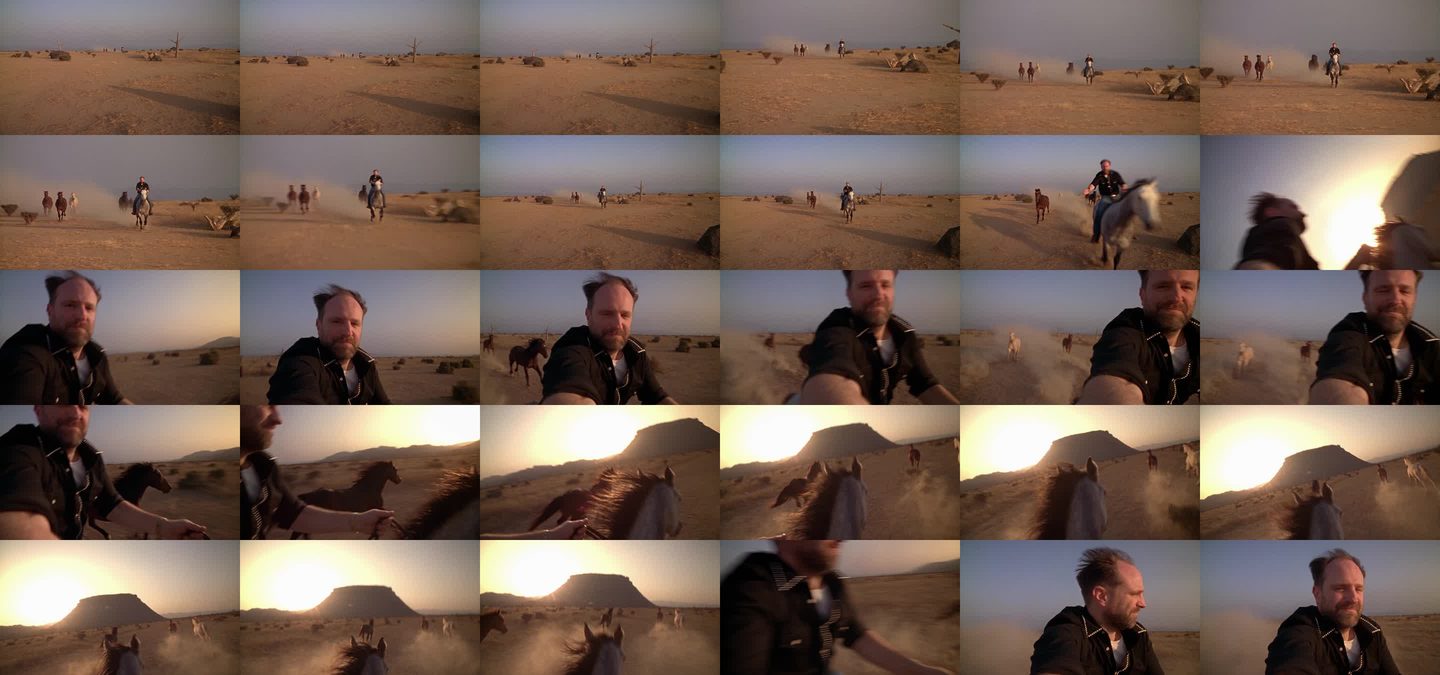
THE GRAB — CRITICAL, no cut: at 5.6s his right hand reaches in from screen-right and closes over the lens, the palm covers the frame dark for a quarter second, then in one unbroken motion the viewpoint is pulled up and swung around — half a second of motion-blurred dirt, sky, sun glow and black sleeve whipping past as the arm turns the lens back toward him — and his face slides into frame and settles at arm's length by 6.6s. The hand has real weight, the arm takes the pull, the viewpoint swings with the arm's inertia and settles. One physical move from the fixed position into the hand.
[Image 1] = the rider. Same man, same face, brown eyes, full dark beard with grey, receding hairline, black western shirt with white pearl-snap piping, white t-shirt, gold chain, blue jeans, tooled leather belt with brass buckle, brown boots. No hat, no sunglasses. He rides the dapple-gray horse bareback — no saddle, no bridle, no reins — left hand in the mane, right hand free. HIS HAIR IS IN THE WIND the whole time: at a gallop the headwind pushes his short hair back and up off the forehead, loose strands lifting and flicking with every stride, never a neat still haircut, the thin top and the sides visibly moving.
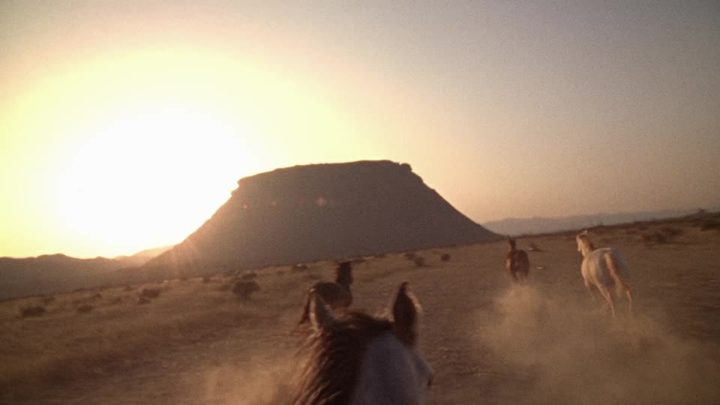
[Image 2] = the horses and the world. The same six horses with the same coats, no tack on any of them, the same open dry plain, dead tree, scrub, hazy hills, low warm sun behind the haze. In the direction the horses run, a big wide flat-topped hill rises from the plain on the horizon, placed exactly where [Video 1] has it — a dark warm silhouette softened by the haze, the herd running toward it.
ACTION: 0–3s the rider on the gray gallops straight at the lens from the distance, the other five horses loose 20–40 metres behind him, dust streaming. 3–5.6s he closes fast, slightly toward screen-right, eyes on the lens, right arm reaching out, hair blown back by the headwind. 5.6–6.6s the grab. 6.6–8s his face and shoulders at arm's length, plain rushing behind, frame bouncing; hair whipping back and up in the wind, strands flicking across his forehead, beard and shirt collar fluttering; eyes narrowed against the sun and wind, mouth closed, a small dry smirk, one slow nod — no wide smile, no blank stare. 8–11.5s the camera swings to his left and then across to his right as the loose horses overtake him close on both sides, hooves and dust, and pull ahead. 11.5–13s the camera holds on the herd running ahead of him toward the big hill on the horizon, the hill filling the upper background exactly as in [Video 1], his own horse's ears and mane in the lower frame. 13–15s back to his face, hair still blowing, smirk held, glancing at the horses and back to the lens.
PHYSICS: real 500kg horses at a full gallop on hard dirt, bodies rising and falling with every stride, manes and tails lagging the motion, dust kicked from every hoof and lit gold by the low sun, contact shadows under hooves. The rider's weight rides the gallop bareback, hips absorbing each stride. A strong headwind of roughly 45 km/h from the direction of travel constantly pushes his hair, beard, collar and sleeves backward — the hair streams and flicks with real lag behind every bounce of his head, the same wind that carries the dust behind the horses. Horses overtake at real closing speed and never clip through each other. Nothing floats, slides or teleports.
AUDIO: only horses and the environment — hoofbeats on hard dirt growing to a pounding gallop, wind across the open plain, dry grass, horses snorting and thundering past close, wind buffeting the microphone once the camera is in his hand. The rider makes no sound. No music of any kind, no voice.
NO on-screen text, captions, subtitles, logos or watermarks anywhere. No camera, lens, lens barrel, tripod or equipment visible in frame. No CGI look, no smooth skin, no static helmet-hair, no gimbal stabilization, no slow motion, no frame interpolation.
What each block is doing
- LOOK — one sentence pointing at Image 2. The still carries grain, haze and colour better than any paragraph about Super 16.
- NOTHING IN THE FOREGROUND — added after a take drew a lens barrel into the bottom of the frame. The word “camera” as a physical object gets painted; say viewpoint in POV sections and forbid equipment explicitly.
- CAMERA — locks motion to Video 1 and declares it a terrain-layout reference too, so the hill lands where Blender put it.
- THE GRAB — the only thing that keeps the hand-off from becoming a cut: hand covers → half a second of motion-blurred whip → face slides in. If you ever see a cut, this block and the 5.6–6.6 s timing are what you tune.
- ACTION — the Blender markers, converted to seconds. Same beats, same order.
- PHYSICS / hair — wind is stated three times (rider block, action, physics). Once wasn’t enough; the hair stayed a helmet.
- AUDIO — diegetic only, rider silent, explicit “no music”. Seedance loves to add a score.
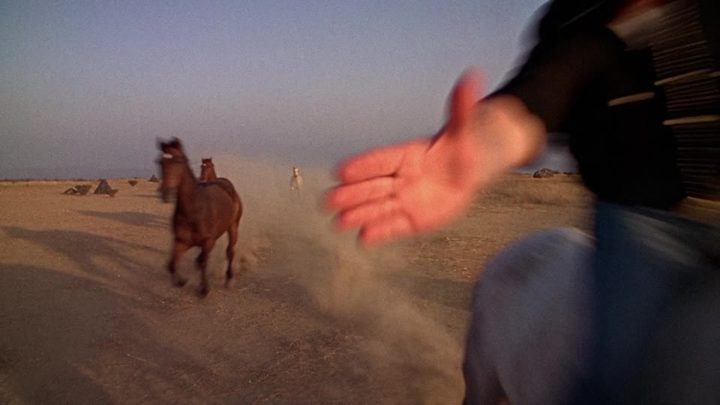
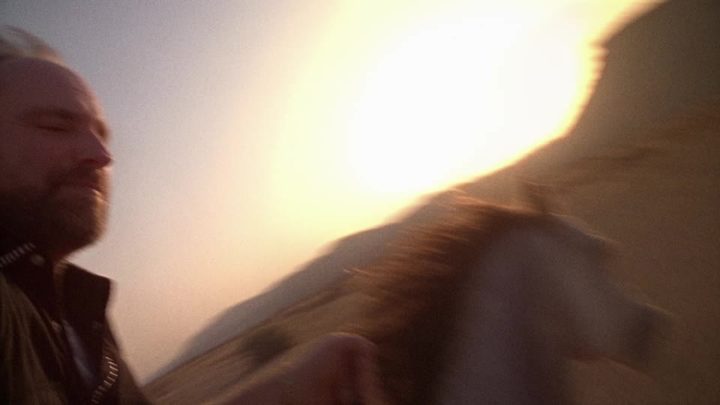
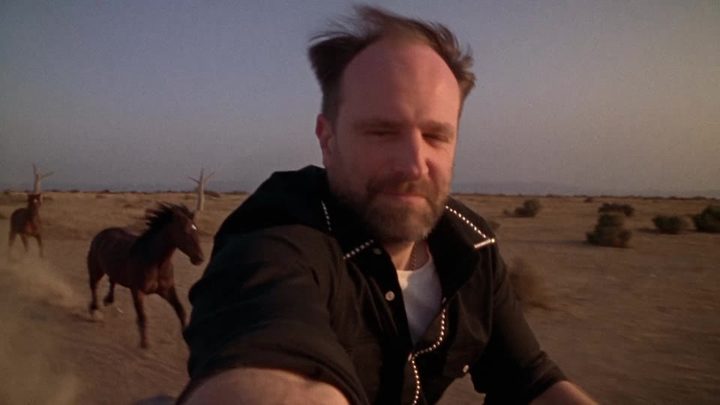
What went wrong, and the line that fixed it
Edit, sound, cover, post
- The stack. 1080 × 1920. Seedance on top, Blender playblast in the middle, phone screen-record at the bottom — all three locked to the same timecode so the viewer sees the phone move, the grey camera follow, and the film obey.
- Loudness. Mix to −14 LUFS integrated, true peak −1 dBTP. Music under a voice-over sits at −18 to −22 dB; under natural sound only, −10 to −14 dB. Instagram normalises to −14, so a quiet mix just gets noise pulled up.
- Cover. Upload 1080 × 1920. The profile grid shows a 3:4 centre crop — keep faces and words inside the middle 1080 × 1440 (1080 × 1350 to be safe with older layouts). In the Reels player leave ~120 px on the right for the icons and ~320 px at the bottom for the caption.
- End card. Four seconds, stop-motion type, one word to comment. It is the same file family as this page — Poppins, Lora italic, the yellow horse.